고정 헤더 영역
상세 컨텐츠
본문
다음의 코드를 사용하면 된다.
display: block;
margin-left: auto;
marign-right: auto;
여기서 display: block이란?
가로행을 전부 차지하란 의미이다!
<div>, <p>, <h> 는 display: block이 기본으로 있다.
즉, <div>는 기본적으로 가로행을 모두 차지한다.
따라서 두개의 <div>를 쓰게 되면 하나의 <div>가 밑으로 내려간다.

<!DOCTYPE html>
<html lang="en">
  <head>
    <meta charset="UTF-8" />
    <meta name="viewport" content="width=device-width, initial-scale=1.0" />
    <title>Document</title>
    <link href="css/main.css" rel="stylesheet" />
  </head>
  <body>
    <div class="container">
      <div class="header"></div>
      <div class="left-menu"></div>
      <div class="right-menu"></div>
      <div class="footer"></div>
    </div>
  </body>
</html>
.container {
  width: 800px;
}

.header {
  width: 100%;
  height: 100px;
  background: pink;
}
.left-menu {
  width: 20%;
  height: 400px;
  background: rebeccapurple;
  /* float: left; */
}
.right-menu {
  width: 80%;
  height: 400px;
  background: brown;
  /* float: left; */
}
주석 처리해둔 float: left를 사용하게 되면 두개의 <div>를 가로 정렬할 수 있다.
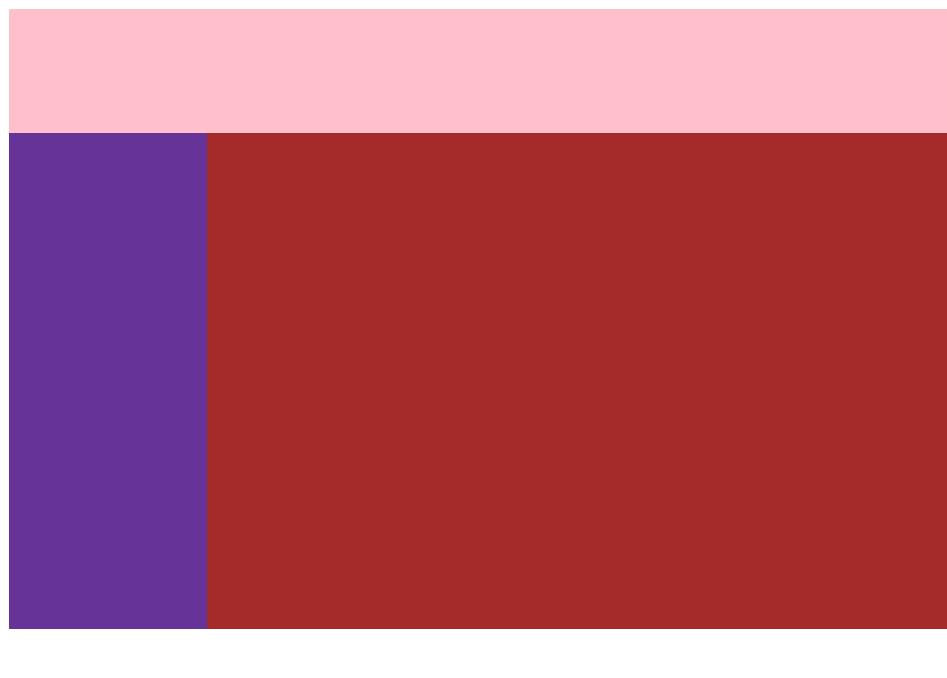
위의 레이아웃의 하단에 footer 태그를 넣었지만 보이지 않는 이유가 무엇일까???
.footer {
  width: 100%;
  height: 100px;
  background-color: grey;
}
float: left는 화면에서 붕 띄어주기 때문에 footer가 header의 바로 아래에 위치하기 때문이다.
이를 해결하기 위해서는 clear: both;를 쓴다.
.footer {
  width: 100%;
  height: 100px;
  background-color: grey;
  clear: both;
}
'HTML, CSS' 카테고리의 다른 글
| 블로그 페이지 만들기 (0) | 2024.01.21 |
|---|---|
| display: block, inline-block (0) | 2024.01.21 |
| [CSS] transition, animation, flexbox, Tailwind CSS (0) | 2023.03.29 |
| [CSS] 기초(03/23) (2) | 2023.03.25 |
| 2주차 웹, HTML 기초, CSS 기초(03/20) (0) | 2022.04.28 |


